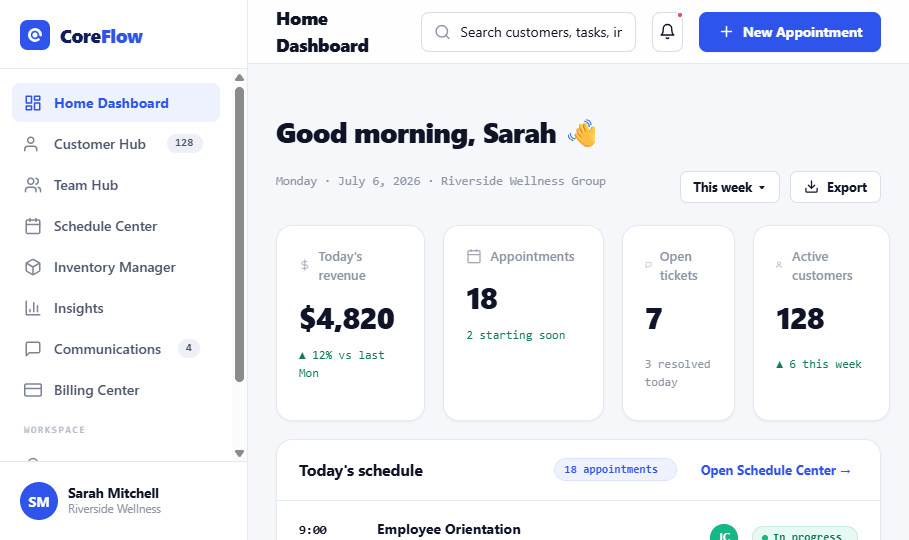
The 5 areas of the dashboard
 12345
12345
1Navigation sidebar, jump to any module.
2Search & top bar, find anything; start a New Appointment.
3Your greeting, welcome + today's date.
4Key numbers, four cards of today's figures.
5Today's schedule, the day's appointments.
Do it fast
Complete a task
Click the
checkbox beside it in Upcoming tasks.
Find anything
Type in the
Search… search box in the top bar, customers, tasks, invoices.
Book an appointment
Click
New Appointment (top right) or the Book appt quick action.
Catch up on alerts
Click the
bell, a red dot means something new.
What your numbers mean
Today's revenue
Taken today vs. last week.
Appointments
Booked today · starting soon.
Open tickets
Support needing attention.
Active customers
Current count · recent growth.
Status badges
In progress Happening right now.
Upcoming Scheduled, not started.
Needs prep Do something before it.
Done Completed task.
Pending Awaiting action.
Quick actions
Add customer
Book appointment
New invoice
Send message
✦
Start-of-day routine: check your key numbers, clear any Needs prep appointments, then work down Upcoming tasks. Two minutes sets up the whole day.
